Build a TikTok product demo storyboard around one observable task. Show the starting conditions, the setup, the product in use, and the result with its limits. Write the claim after reviewing the footage. A successful take can show what happened in that setup; it cannot establish that every buyer will get the same outcome.
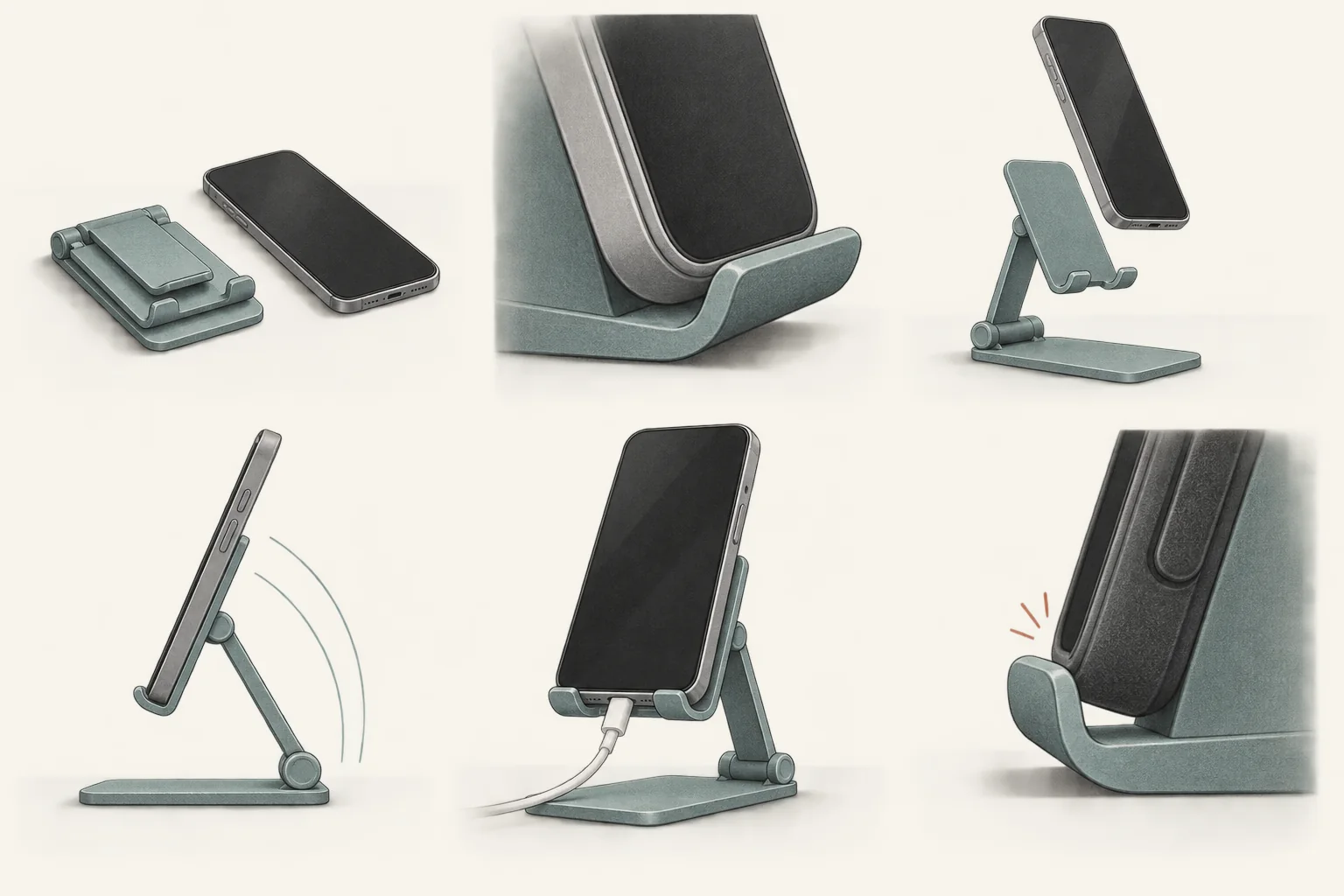
The six-shot plan below uses a hypothetical folding phone stand. It shows how to demonstrate an ordinary product without drifting into promises about universal compatibility, stability, or durability.
Decide what the camera can establish
Start with a task a viewer can inspect: placing a phone on a stand, adjusting its angle, and using it on a desk. Avoid starting with a promise such as "the stand that never falls over."
Separate three kinds of statement before filming:
- Visible action. The hinge moves, the phone rests on the support, and the cable passes through the opening.
- Product specification. Supported dimensions, load limits, and materials need reliable documentation for the model being shown.
- Performance claim. Universal fit, long-term stability, or an advantage over another stand needs evidence beyond this demonstration.
For US advertising, the FTC's advertising guidance requires evidence for claims before the ad runs. It considers implied claims and material omissions as well as spoken words. A silent sequence can therefore make a claim that the script never states.
For paid TikTok distribution, TikTok's misleading-content policy prohibits promised or exaggerated product effects. It also prohibits product-effect comparisons that give viewers a false impression. These rules do not make every starting-state/result sequence unacceptable. They make the impression created by the sequence part of the review.
Use this storyboard as a production recommendation. It is not a platform-required format or a legal clearance. It covers an ordinary product demonstration, not a TikTok Shop listing review or a regulated-product campaign.
A six-shot illustrative storyboard
This is a hypothetical filming plan, not a report of a tested product. Confirm the stand's instructions first. Fill the production brief with the actual product model, phone model, case, desk surface, and intended use. Keep those details with the original footage.
| Shot | Picture and action | What the viewer needs to know | Keep out of the edit |
|---|---|---|---|
| 1. The task | Wide desk view with the phone and folded stand together. Introduce the task of positioning the phone for desk use. | Which stand and phone are being demonstrated. Make any sponsorship disclosure noticeable from the start. | A claim that this will solve every desk setup. |
| 2. The conditions | Close view of the phone, its case, and the flat desk surface. | The case stays on or comes off. Say which, before showing the fit. | A thick case in the opening shot replaced with a bare phone without explanation. |
| 3. The setup | Show the stand unfolding and the phone being placed on it. Keep the support points visible. | Any adjustment, locking step, or accessory needed for this setup. | Hidden adhesive, off-camera supports, or a helper holding the phone. |
| 4. The operation | In one continuous view, adjust the viewing angle and touch the phone as the intended task requires. | What the demonstrator did, including any need to steady or reposition the stand. | A cut that removes a slip, extra adjustment, or required hand support. |
| 5. The inspection | Hold the same setup in view. Show the actual fit and whether the cable can connect in that position. | The observed result for this phone and case. Keep any obstruction visible. | A universal-fit claim or an untested statement about charging performance. |
| 6. The limit and next step | Show the product model again beside the phone. Direct viewers to check dimensions and compatibility information. | What this demonstration did not test, such as other phone sizes or long-term wear. | "Works with everything," a durability promise, or an invented discount. |
Record enough footage for the viewer to follow the operation. Do not decide that a speed claim is true because the finished video is short. If the task takes longer than the edit allows, keep elapsed-time claims out or show the compression clearly.
The result may change the script. If the cable does not fit with the case attached, show that condition or choose another documented use. Removing the case between shots and leaving the narration unchanged would create a different impression.
Write the observation after the take
A claim note should identify the sentence, the evidence, and the boundary. For this hypothetical demo, the note might read:
| Proposed statement | Evidence needed | Editing decision |
|---|---|---|
| "I can connect this cable with this case on." | Footage of that connection in the demonstrated position. | Use only if the take shows it. Do not imply a charging-speed result. |
| "It fits every phone." | Evidence covering the claimed range of phones and configurations. | Remove from this demo. One setup cannot establish the claim. |
| "It stays stable all day." | Relevant evidence supporting the duration and conditions claimed. | Remove unless the brand can support and approve it. |
| "Check the listed dimensions against your phone and case." | A current destination containing the correct model's dimensions. | Use after checking the destination. |
Even a narrow sentence can sit beside footage that implies something broader. Review the whole sequence. A creator saying "for my phone" does not repair an overlay promising universal compatibility.
Give the creator room to describe what they observed. If you need to settle the permissible wording before production, use a brief focused on product-claim limits. Keep the shot list focused on what must remain visible.
Review the factual claims in the final cut
Have someone who did not edit the video watch it once without sound. Ask what they think the product can do. Then review it with narration, captions, and overlays.
Use this checklist before approval:
- Does the product shown match the model linked from the post?
- Can the viewer see any case removal, preparation, locking step, or extra accessory that affects the result?
- Did cuts, playback speed, camera angle, or retouching change the apparent result?
- Does every measurable statement have supporting evidence beyond the editor's confidence?
- Does the video imply the result applies to devices or conditions that were never tested?
- Are important limits readable while the relevant claim appears?
- Do the thumbnail, caption, voiceover, and destination describe the same product and offer?
- Is the commercial relationship disclosed for the intended publication?
The FTC guidance says qualifying information must be noticeable and understandable. Fine print cannot contradict the main claim. If the headline needs a disclaimer that reverses its meaning, rewrite the headline.
A casual filming style does not remove this review. Modash's TikTok UGC guide distinguishes spontaneous customer content from paid creator work styled as UGC. Apply the same evidence review when a commissioned demonstration looks like an informal desk video.
TikTok also requires its content disclosure setting for promotional posts. Own-business promotion uses the Promotional content label; branded content for another business uses Paid partnership. Plan the disclosure choice before upload. Check local disclosure requirements separately from the platform setting.
Send the creator the six-shot plan with the actual product and setup details. Before filming, mark any shot whose intended conclusion lacks evidence. Change that shot or remove the conclusion, then record the task as it happens.