Give the creator a brief that requires accurate, timed captions for speech and meaningful sounds, readable on-screen text, and visuals that show each product step. Then review the finished Reel on a phone with sound off. A viewer should be able to identify the product, follow the demonstration, understand any limits, and know what to do next without guessing what the creator said.
This is a production checklist for sound-off understanding. It does not promise more reach or certify full accessibility. People who cannot see the demonstration also need access to its visual information, so retain descriptive narration alongside the visual work.
Specify what must survive the mute test
Before filming, write one sentence describing what the viewer should learn. For a folding phone stand, that might be: "The viewer can open the stand, choose a support slot, and place a phone on it."
List every fact needed to reach that outcome. Assign each fact to a shot and to the words that explain it. If a fact exists only in the voiceover, add its meaning to the visual sequence or on-screen text. If the camera cannot show it clearly, change the shot.
Keep these three text jobs separate:
| Text type | Job in the Reel | Review question |
|---|---|---|
| Timed captions | Represent speech and meaningful sound as it happens | Does the text preserve the audio's meaning? |
| Instruction labels | Identify a part, action, or limit | Can someone follow the step while muted? |
| Post description | Supply a written summary and supporting detail | Does it explain the demonstration outside the moving sequence? |
A short label such as "Choose a slot" can guide attention. It cannot replace captions for a spoken explanation about which slot to use. Avoid making the viewer read an instruction, a long caption, and a product claim at the same moment. Shorten the spoken script or give the instruction its own shot.
For the wider creative plan, use an Instagram brief built around the viewing experience. Add these requirements before the creator films, while there is still time to reserve clear space for text.
Caption the information, including useful sounds
W3C's caption guidance describes captions as synchronized text for speech and non-speech audio needed to understand the content. It also warns that automatic captions need accuracy checks. A missing negative or incorrect product name can change the message.
Ask the creator or editor to check the captions against the final audio, not an earlier script. Review names, measurements, negatives, and any instruction that affects how someone uses the product. Keep the caption on screen while the matching speech or sound occurs.
Sound can carry a product instruction. If a latch makes a click that confirms closure, show the latch reaching its closed position and caption the meaningful sound. Do not rely on a beat drop or an off-screen click to tell viewers that a step is complete. Decorative background music needs no invented description of product performance.
Choose the caption method during editing. W3C distinguishes open captions, which remain visible, from closed captions, which viewers can turn on or off. If you deliver captions as part of the video image, review their placement in that export. If your workflow uses a separate caption display, review that display too. Avoid two competing caption layers over the same action.
This guide does not prescribe current Instagram menu paths or claim that a particular caption tool is available to every account.
Make text readable over the moving image
Use a stable text position, a plain typeface, and a solid or sufficiently opaque backing when footage changes brightness. Keep text away from the product detail it describes. Check the final viewing preview for controls or other text that cover the instruction.
As a production target, use at least 4.5:1 contrast between ordinary text and its background. That value comes from WCAG 2.2's contrast criterion. WCAG allows a lower ratio for qualifying large text, but a large font in an editing project may become small on a phone. Using the ordinary-text target avoids relying on that exception.
This is a recommendation informed by a web accessibility standard, not an Instagram publishing rule or a legal compliance finding. Contrast alone also cannot fix tiny type or a caption that disappears before someone can read it.
Review the moving footage, rather than judging one still frame. Give viewers enough time to read the words and inspect the action. If a reviewer must pause repeatedly, reduce the text, extend the shot, or split the instruction. Do not shrink the words to keep an arbitrary running time.
Later's Instagram accessibility article recommends solid subtitle backgrounds and reviewing content with sound off. Its article dates to 2020, so use those production principles without adopting its older app instructions.
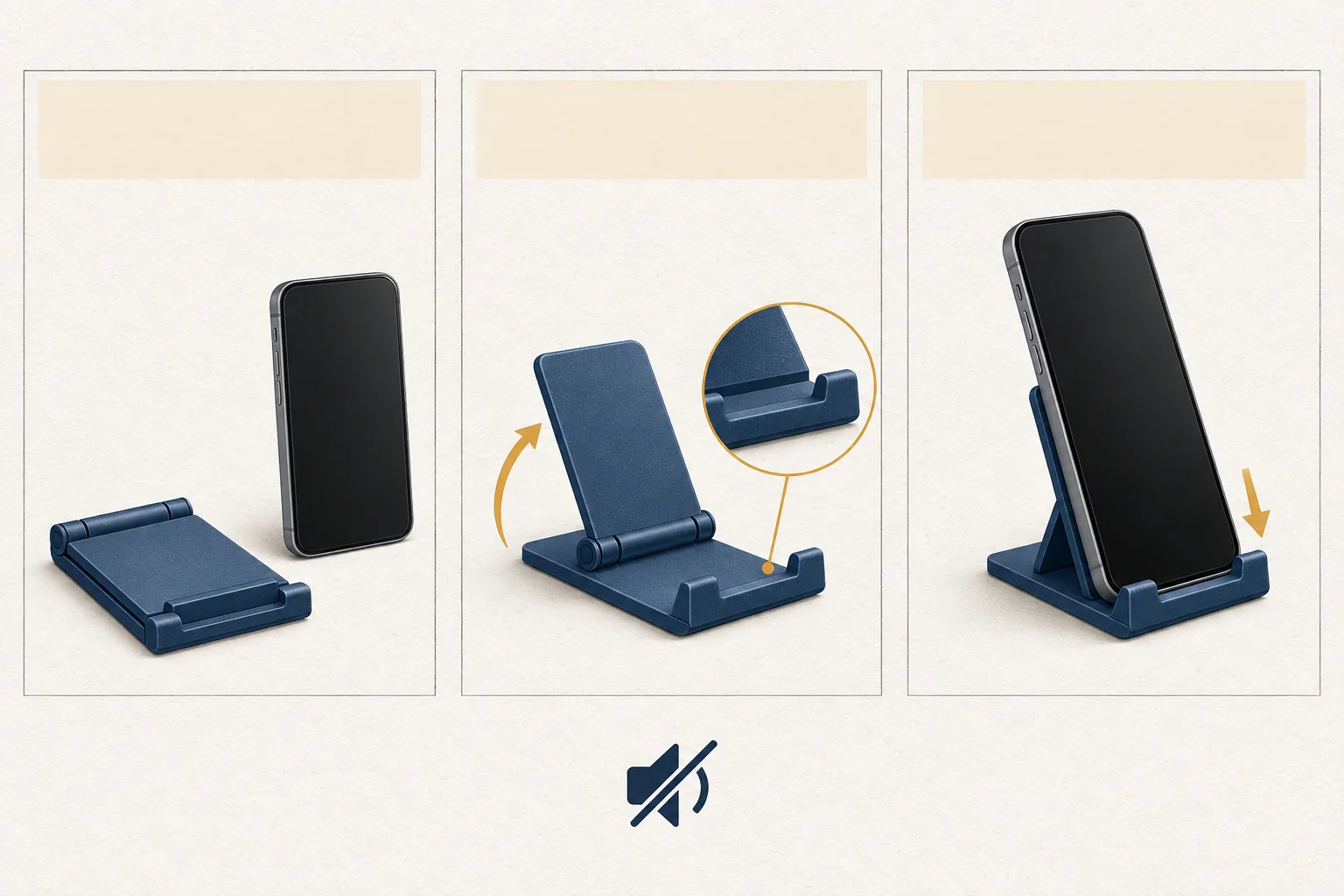
An illustrative phone-stand storyboard
The following is a hypothetical creative example. It describes an imagined folding stand, not a tested product or a claim about a real brand. Replace its mechanics with the product's verified instructions before filming. The example text describes information to include; any additional spoken words still need captions.
| Shot | Visible action | Text or caption content | Sound-off check |
|---|---|---|---|
| Introduce | Show the folded stand beside a phone | Identify it as a folding phone stand | Can the viewer name the product? |
| Open | Show the hinge opening in one continuous shot | Explain which section to lift | Is the starting position visible? |
| Adjust | Show the support entering a slot in close-up | Explain that this slot sets the angle | Can the viewer see the contact point? |
| Place | Show the phone resting on the lower ledge | Explain where the phone rests | Does the text leave the ledge visible? |
| Finish | Hold the assembled view | Invite the viewer to read the written setup summary | Is the next action understandable while muted? |
Keep narration specific enough to describe the important action. "I place the support into the rear slot" conveys more than "Then do this." This also follows Later's recommendation to verbalize visual details. A silent review checks one viewing condition; it cannot establish that someone who cannot see the screen can follow the Reel.
Run the final accessibility review
Give the finished version to a reviewer who did not write the script. Ask them to watch once with sound off before reading the post description. Treat this as an editorial comprehension check, not a substitute for testing with people with disabilities.
Use this checklist:
- The reviewer can name the product and explain the demonstrated action.
- Every spoken instruction has accurate, synchronized captions.
- Meaningful sounds have a visible explanation or caption.
- Product names, quantities, negatives, and limits match the approved facts.
- Text remains readable through changes in background brightness.
- Captions leave the product's moving parts and contact points visible.
- The reviewer can read each instruction and watch its action without repeated pauses.
- Color changes have words or another visible cue when they carry meaning.
- The final viewing preview has no overlapping caption layers or covered instructions.
- The post description summarizes the steps, and narration describes important visual details.
Record failed checks by shot and describe the needed change. "Move the caption above the hinge" gives the editor a usable correction. Keep that feedback in one accountable approval process so later revisions do not restore a problem someone already fixed.
Send the creator the storyboard and checklist with the brief. Require a second muted review after the last edit, using the exact version intended for publication.